The Project
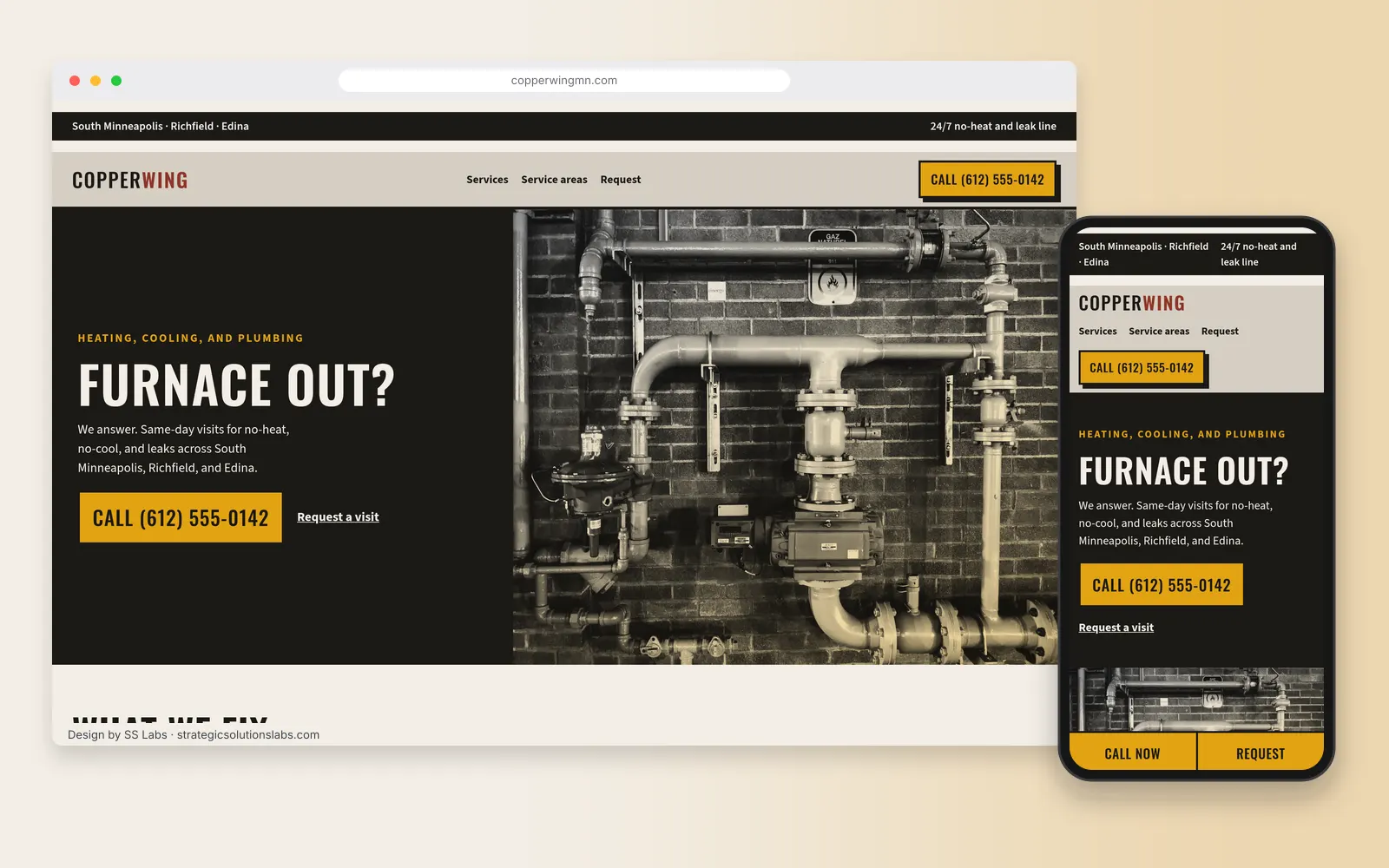
The project is a website for Copperwing Heating & Plumbing, a heating, cooling and plumbing company serving South Minneapolis, Richfield and Edina. It's a classic home-services problem: most visitors land on the site because something is broken. A furnace quit on a January night, or a water heater is leaking into the basement. They are on a phone, they are stressed, and they will call whichever company makes it easiest.
A lot of trades websites make that hard. The phone number is buried in the footer, every service is crammed onto one long page, and nothing tells Google which suburbs the company actually serves. This design fixes each of those.
The Goals
- Make calling the easiest thing on every page. Tap-to-call in the header, the hero and a sticky bar on mobile.
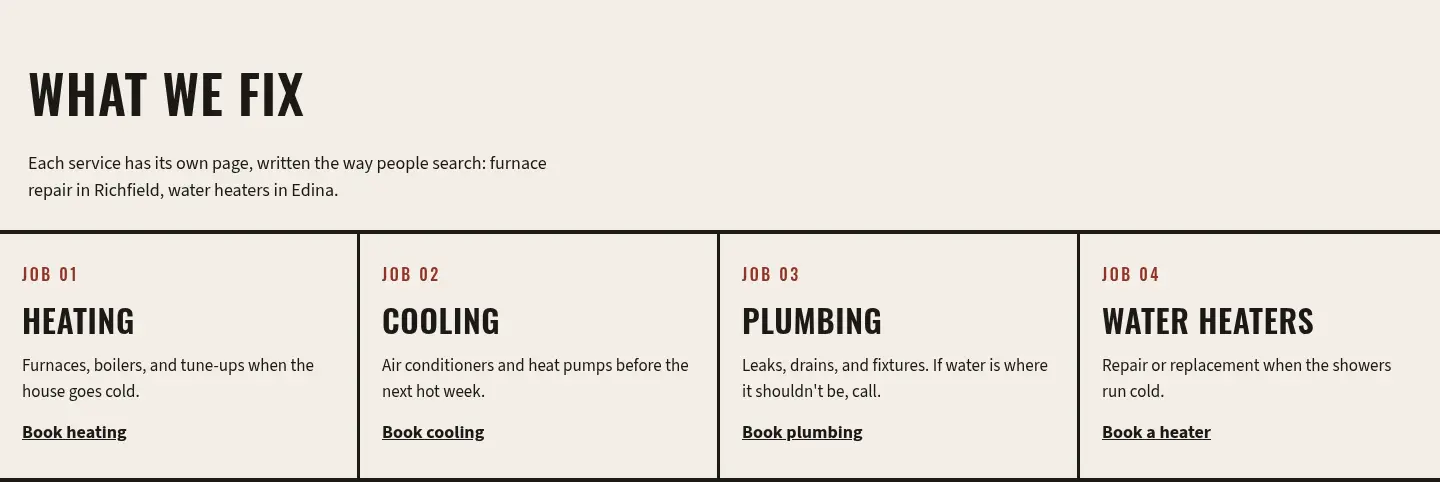
- Give every service its own page. Furnace and boiler repair, AC and heat pumps, plumbing repair and water heaters each get a page that answers the questions people search for.
- Show up in the right suburbs. Build service-area pages and a Google Business Profile setup that match the cities the company actually drives to.
- Let the office update specials without a developer. Seasonal tune-up offers and rebates change every few months, so they live in a simple CMS.
- Capture after-hours requests. A short service-request form for people who would rather not call.
Package Fit
Package: Custom Website with Mock-ups and CMS, $8,000.
A multi-service trades company with service-area pages and rotating offers is exactly what this package is for. It's the only SS Labs package that includes a custom CMS system and design mock-ups before development starts, and it comes with 4 rounds of revisions, an XML sitemap, Google Analytics and Google Business Profile setup. A smaller template package would get a good-looking homepage live, but it wouldn't give the office a way to manage service pages and specials on its own.
See every package side by side on our website packages section.
Design Approach
Colors: Soot (#1B1916) for the hero and the rules, paper (#F3EEE6) for the page, safety amber (#E2A312) for every call button and the mobile bar, oxide red (#8E3428) for the job numbers, steel (#3C4650) behind the request band, and galvanized gray (#D5CFC3) for the header and footer. Amber is only used on the thing to tap.
Type: Oswald, a condensed gothic, for the wordmark, the headlines, and the call button. Source Sans 3 at 18px for body copy, form labels, and the utility bar.
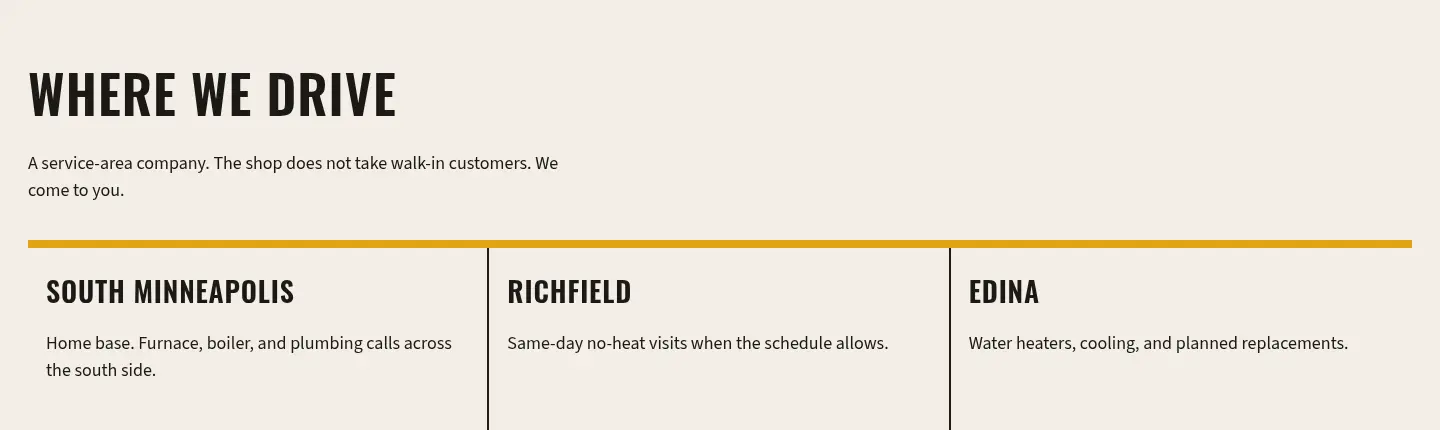
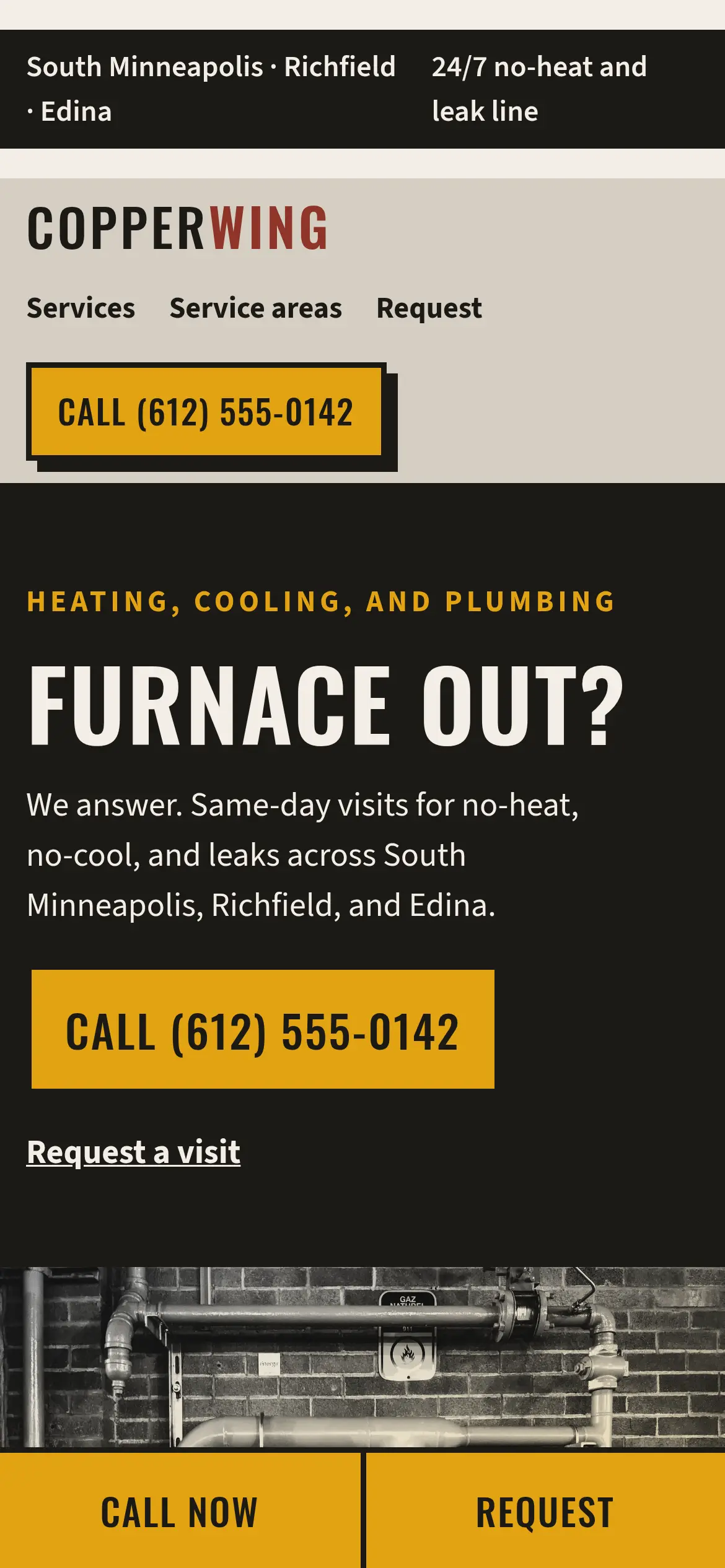
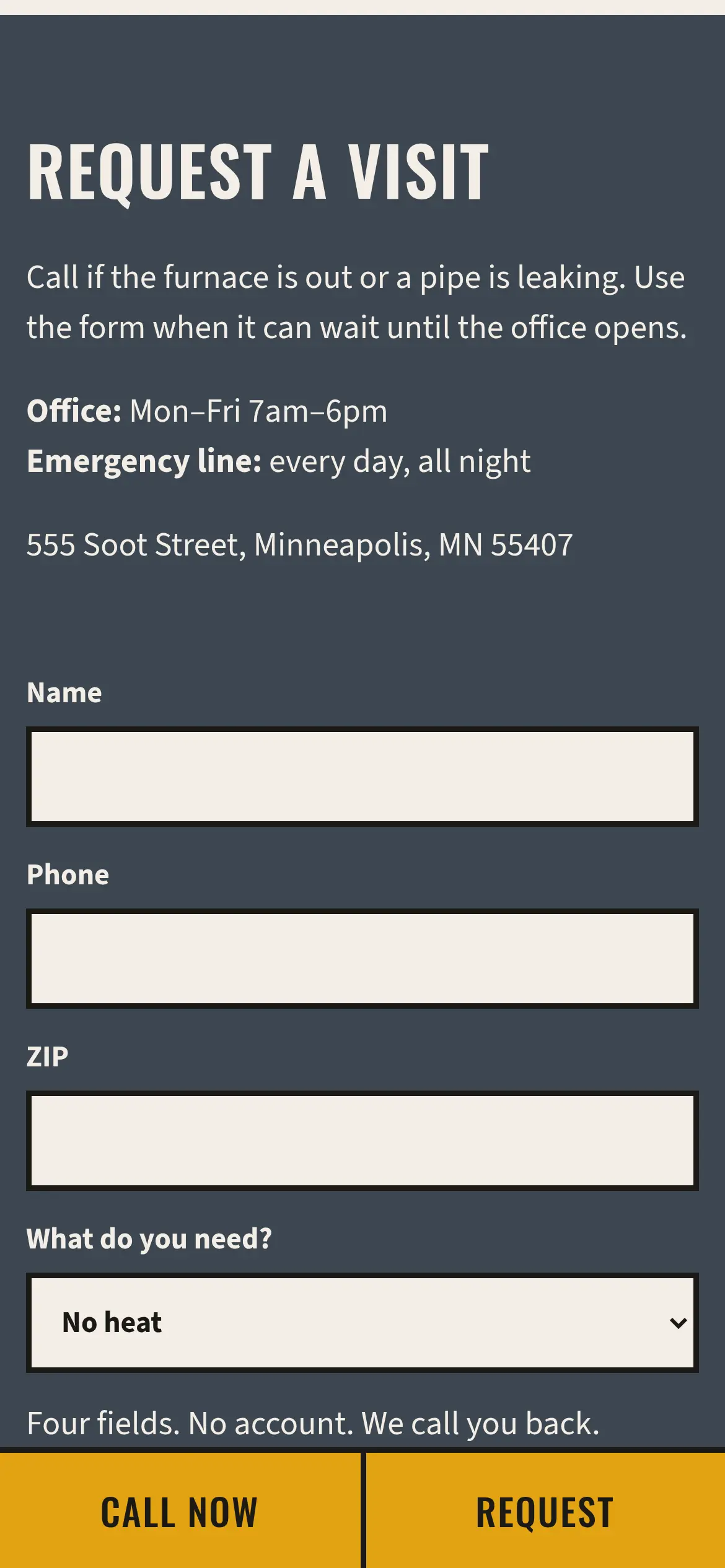
Layout: A soot utility bar names the service area and the 24/7 line. Under it, a galvanized header holds the wordmark, text links, and a square amber "Call" button with a hard offset shadow. The hero is a two-column poster. "Furnace out?" and the phone button sit on soot, and a duotone photo of a technician fills the other half. Below, four work-order tickets list heating, cooling, plumbing, and water heaters. A route strip names South Minneapolis, Richfield, and Edina. The four-field form lives in its own steel band. On a phone, a fixed amber bar keeps "Call now" and "Request" on screen, with sharp corners rather than pills.
Imagery: One Unsplash photograph, turned grayscale and covered with a steel-and-amber multiply overlay. The rest of the page is type, rules, and job numbers.
Key pages:
- Home
- Heating (furnace and boiler repair, replacement, tune-ups)
- Cooling (AC and heat pumps)
- Plumbing (repairs, drains, water heaters)
- Service Areas (South Minneapolis, Richfield, Edina, each with its own page)
- Specials (managed in the CMS)
- Contact and Request Service
What We Built
- Mobile-first, responsive layout: On phones, a sticky bottom bar keeps "Call Now" and "Book" one thumb-tap away while visitors scroll.
- Tap-to-call everywhere: The phone number is a real
tel:link in the utility bar, the hero and the footer. - Service-request form: Name, phone, ZIP and a "what do you need?" dropdown. Four fields, nothing more.
- Local SEO structure: One page per service and one page per service area, each with its own title tag, meta description and H1 written around how people actually search ("furnace repair Richfield").
- LocalBusiness schema: Structured data using the most specific schema.org types,
HVACBusinessandPlumber, as an array, which is the approach Google recommends for businesses that offer more than one service. - Google Business Profile setup: Configured as a service-area business. Google says that if you don't serve customers at your business address you should remove the address from your profile, and that you can list up to 20 service areas (Google Business Profile Help).
- Custom CMS: The office can edit specials, rebates and seasonal banners without touching code.
- Analytics and sitemap: Google Analytics with call-click and form-submit events, plus an XML sitemap submitted to Google Search Console.
Here is the kind of structured data the site ships with (the street address, hours and final URLs are filled in at launch):
{
  "@context": "https://schema.org",
  "@type": ["HVACBusiness", "Plumber"],
  "name": "Copperwing Heating & Plumbing",
  "url": "https://copperwingheating.com",
  "telephone": "+1-612-555-0142",
  "address": {
    "@type": "PostalAddress",
    "addressLocality": "Minneapolis",
    "addressRegion": "MN",
    "addressCountry": "US"
  },
  "areaServed": ["Minneapolis", "Richfield", "Edina"],
  "openingHours": "Mo-Su 00:00-23:59"
}
Process Timeline
Here's a typical schedule for a build this size. Your quote confirms the real timeline.
- Week 1: brainstorm and sitemap. A 1-hour brainstorm covers services, service areas, competitors and brand. Then we map every page, plan the URLs and research the keywords each page targets.
- Week 2: mock-ups. Desktop and mobile mock-ups of the homepage and one service page, with revision rounds until the direction is locked.
- Weeks 3 and 4: development and CMS. We build the templates, the service and service-area pages, the request form and the CMS for specials, on a staging link you can review as it comes together.
- Week 5: SEO, schema and testing. Titles, meta descriptions, schema, the sitemap and analytics events. Then testing across browsers and devices, including the sticky call bar on several phones.
- Week 6: launch and Google Business Profile. Launch, Search Console submission, Google Business Profile service-area setup, and a walkthrough of the CMS.
What It's Designed to Drive
- More phone calls from mobile visitors. The call button is never more than a thumb-tap away.
- Service requests outside office hours. A short form catches people who won't call at 10 p.m.
- Visibility in each suburb served. Service-area pages and the Business Profile are designed to line up with how Google says it ranks local results: relevance, distance and prominence (Google Business Profile Help).
- Less waiting on a developer. Specials and banners are designed to be updated by the office in minutes.
- Clear measurement. Call clicks and form submissions are tracked as separate events, so you can see which pages turn visits into requests.
Frequently Asked Questions
Q: How much does a website for an HVAC or plumbing company cost with SS Labs? A: A multi-service site with service-area pages and a CMS, like this one, fits our $8,000 custom package. Smaller shops that need a fast, professional site can start with the $1,000 Local Small Business package or the $2,200 Website in a Week package.
Q: Should a service-area business show its address on Google? A: Google says that if you don't serve customers at your business address, you should remove the address from your Business Profile and set service areas instead.
Q: Why build a separate page for each service and suburb? A: Separate pages let each one answer a specific search, like "water heater replacement Edina," with its own title, content and call to action, instead of one page trying to rank for everything.
Start Your Project
Run a trades or home-services business in the Twin Cities? We'll walk you through what a site like this would look like for you.
- Email: Ben@StrategicSolutionsLabs.com
- Free 30-minute consultation, and a reply within 24 hours
Explore our website packages, our process, Minneapolis web design, SEO services, or more projects in the design showcase.
Sources
Checked October 7, 2026.